

- nature apps
- nature apps for kids
- kids
- outdoor learning
- nature identification
- family activities
- wildlife
Best Nature Apps for Kids in 2026: 6 Family Favorites
The best nature apps for kids in 2026: Snappit, Seek, Merlin, iNaturalist, Google Lens and Pl@ntNet compared for photo ID, bird songs and family nature walks.
Your kid freezes mid-step, points at a shiny green beetle on the path and asks, "What's THAT?" The best nature apps for kids help you answer that question on the spot, and then get the phone back in your pocket so the walk stays a walk.
Our quick picks: Snappit for young explorers who want to identify everything and collect their finds as cards, Merlin for birdsong, and Seek for a free, account-free camera ID. Add Pl@ntNet for plant-obsessed outings, iNaturalist when your family wants to share observations with a community, and Google Lens for a quick visual search.
How to pick a nature app for your child
Think about what your kid gets excited by. A four-year-old usually loves spotting and pointing while a grown-up holds the phone. A nine-year-old might want to keep a list, compare species or become the family bird expert. Either way, your child doesn't need their own account just to enjoy a nature walk.
Treat any ID as a smart suggestion. Look at the photo, the features you can see, the habitat and whether it fits your area. Sometimes "a beetle" is the most accurate answer. And no app can tell you an unfamiliar plant or mushroom is safe to eat, or that an animal is safe to handle.
The 6 best nature apps for kids and families

Snappit: best all-in-one nature app for kids
Snappit is the app we built for our own kids, so we're a little biased, but it's made for exactly this age. Your child snaps a photo and Snappit identifies plants, insects, birds, mammals, reptiles, fish, fungi, flowers and trees, all in one app. Every find becomes a collectible card with a rarity tier, and kids race to complete collections, earn badges and tackle a daily discovery challenge.
The facts are written for young readers: short and friendly enough that a six-year-old can follow and a four-year-old loves hearing them read aloud. There's a built-in field guide with 9,000+ species to browse in the object catalog, plus guides for thousands of parks, zoos and aquariums in the places directory, with checklists so kids can pick a mission before leaving home.
Everything stays in a private family collection and discovery map. No ads, no chat, no social feed and no strangers. It's rated 4+ and free on Android and iOS, with free identifications every day and an optional subscription for unlimited snaps. New photo IDs need a connection, so on a no-signal trail, snap away and identify when you're back in range.
Seek by iNaturalist: best free, no-account option
Seek uses the camera to suggest names, with badges and challenges to keep kids going. Everyday use needs no account, which makes it easy on a shared family phone. When a photo isn't clear enough, it'll stop at a broader group.
Observation records stay on the device by default, and posting to iNaturalist is a separate choice. The Seek privacy policy covers approximate location, IP addresses and image processing, so it's worth a quick look at permissions before you head out.
Merlin Bird ID: best for bird songs
Merlin from the Cornell Lab is the go-to for birds, with Sound ID, Photo ID and a question-based ID wizard. It's the perfect partner for Snappit, since Snappit doesn't identify songs. Sound ID's species coverage varies by region, so compare suggestions with what you actually hear and see.
Merlin's Life List is a fun way to track birds. Cornell's saving instructions say to save only confidently identified birds, confirm date and location, and connect to the internet to save. For more, see our bird identification apps guide.
iNaturalist: best for budding citizen scientists
iNaturalist lets you post observations and get identifications from a community of naturalists. It suits families who want to document local wildlife and revisit puzzling finds. Replies aren't guaranteed, and posting doesn't automatically make an observation Research Grade; data-quality requirements apply.
Accounts for kids under 13 go through a formal parent-consent process. That guidance suggests trying Seek first and notes that posted observations record time and place, so review geoprivacy together.
Google Lens: best for a quick visual search
Google Lens searches from a camera image or saved photo, covering plants, animals and landmarks. It's handy if you already use the Google app, though it isn't built into every camera.
Lens is a general search tool rather than a kids' nature app. Check the source of a result, compare a few images and expect to need a connection. Review the Google app's privacy settings before photographing people or your home.
Pl@ntNet: best for plant lovers
Pl@ntNet is all about plants. Photograph flowers, leaves and the whole plant without picking anything, and compare the candidate matches. Our plant photo guide shows what to capture.
Its offline identification instructions require an account and an embedded-model download in advance, with reference images downloaded separately. Check coverage on your device before relying on it offline.
Nature app comparison: cost, accounts and offline use

| App | Best for | Account | Connection and prep |
|---|---|---|---|
| Snappit | Kids identifying anything, collectible cards, park checklists | Family profile on a parent's phone | New photo ID needs connectivity |
| Seek | Mixed nature ID, badges and challenges | None for everyday use; posting is optional | Basic on-device ID; some features need network |
| Merlin | Bird sound, photo and guided ID; Life List | Saving birds uses an account | Download regional packs; saving needs internet |
| iNaturalist | Posting observations and discussing IDs | Needed for posting; formal consent under 13 | Uploads and community review need connectivity |
| Google Lens | General visual search | Depends on your Google setup | Expect connectivity |
| Pl@ntNet | Plant photo ID | Needed for offline mode | Download the model; reference images separate |
Seek, Merlin, iNaturalist and Pl@ntNet offer free identification or observation tools, and Lens has no separate nature subscription. Snappit is free with daily identifications and an optional subscription. Check your local store for current offers and download sizes, and remember mobile data can cost money.
Do a quick airplane-mode test at home. Open the exact feature you plan to use. An app that opens offline doesn't mean every feature works without signal. A paper notebook makes a great backup.
Try a 20-minute family nature walk

- Before you go: pick a familiar route, check weather and access, and set up one app. Give your kid a mini mission: find a bird, a plant and a small creature. Snappit's park checklists make great mission lists.
- First five minutes: phones away. Listen, look and notice movement. Ask "What did you see?" before "What's it called?"
- Next ten minutes: stop for two or three finds. Snap the features you can see without disturbing nests or picking up unfamiliar critters. For a hidden bird, listen quietly with Merlin instead of playing calls.
- Last five minutes: compare one suggestion with what you actually noticed, and let your child pick one question to take home.
Flip through these birds to practice comparing bills, wings and body shapes.
Birds to compare before your walk
Explore the field guide →








The place directory can help you pick a spot. Check the venue's own hours, admission and rules before heading out.
Park guides to browse while planning
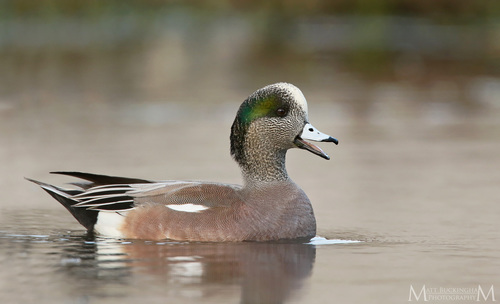
Washington, US
Evergreen Rotary Park
You might spot American Wigeon and Common Goldeneye.
View guide →
California, US
Cabrillo Heights Park
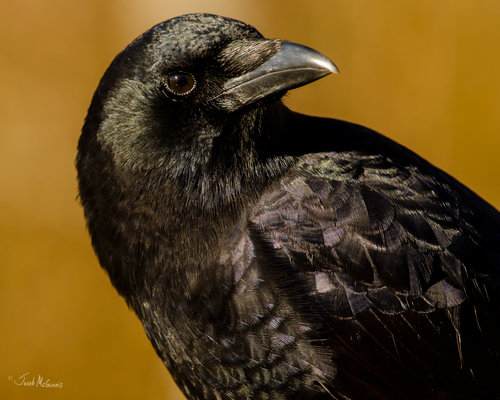
You might spot American Crow and Yellow-Rumped Warbler.
View guide →
Keep the discovery going at home

Back home, pick a favorite photo or Snappit card and ask your child to describe the evidence: "It had six legs" or "The leaves grew in pairs." Add a drawing, the date and a question to a family nature journal. A mystery find is still a great observation.
Want to keep learning? Pick a related word list in Snap Spelling or a nature topic in Snap Quiz, which uses picture answers and audio support. You can also build a themed book in Book Studio for Snap Reading. These are separate apps, so a grown-up chooses the content to match your child's reading level.
Next time, go back to the same spot and see what's changed. That's when nature apps really earn their place: helping kids investigate what they noticed.
Frequently asked questions
Which nature app is best for a young child?
Snappit is our pick for kids around 4–10, because it identifies almost anything and turns each find into a collectible card with kid-friendly facts. Seek is a good free, account-free alternative, and Merlin is the choice if birds are the main event.
Which nature apps work without internet?
Seek has basic on-device identification, Merlin offers offline ID and downloaded bird info (saving a Life List entry needs internet), and Pl@ntNet's offline mode needs setup. Snappit's new photo IDs, Lens searches and iNaturalist uploads need a connection. Test before you go.
Are nature app identifications reliable?
They're great at narrowing things down, but photos, sounds and app coverage have limits. Compare the key features and accept a broader answer when needed. Never use an app to decide whether to eat, touch or handle something unfamiliar.
Does my child need an account?
Not for Snappit on a parent's phone or everyday Seek use. Other apps vary. For an iNaturalist account for someone under 13, follow the formal parent-consent process instead of entering a false age.
Can we use two nature apps together?
Yes. Snappit for everything you can photograph plus Merlin for birdsong is our favorite combo. Give each app one job and keep the walk focused on looking. Add Pl@ntNet if plants become a passion.
Related guides
- Best bird identification apps: photos, sounds and life lists compared.
- Best plant identification apps: the top picks for plant lovers.
- How to make a nature scavenger hunt: prompts for your next family outing.
- Browse Snappit field-guide objects: explore species and their features.