

- handwriting apps
- kids
- letter tracing
- cursive
- Snap Handwriting
- education
- paper practice
Best Handwriting Apps for Kids in 2026: Tracing to Cursive
Best handwriting apps for kids in 2026: Snap Handwriting, LetterSchool, Writing Wizard and iTrace compared for tracing, cursive and moving letters onto paper.
Your kid can name every letter, but their lowercase a still looks like a lopsided balloon and the pencil goes up when it should go down. A good handwriting app can fix a lot of that in ten-minute bursts, as long as it teaches the right letter shapes and nudges your child back to paper.
Here's the short answer. For an Android family that wants tracing, freehand writing and cursive in one ad-free, offline app, start with Snap Handwriting, part of the Snappit family of apps we built for our own kids. Pick Writing Wizard or iTrace if you need to type in your school's exact spelling list, and LetterSchool if your child lights up for animated rewards. Below, we compare all four handwriting apps for kids and finish with a simple screen-to-paper test you can run this week.
What to look for in a handwriting app for kids
Does it match the letters your school teaches?
Ask the teacher for a sample sheet showing the letters, starting points and joins they use. Then compare the tricky ones (lowercase a, f and r) with what the app shows. A "school font" label on an app doesn't guarantee it matches your school's worksheet.
Everything in this guide covers Latin letters, mostly for English. A translated menu doesn't mean an app teaches another language's alphabet or accents, and Latin cursive won't help with Korean Hangul or Russian Cyrillic. Look at the actual practice content before you pay.
Does it move from tracing to writing on their own?
Tracing a path, copying a model and writing a letter from memory are three different skills. The best apps show where to start, animate the direction, then gradually take the guide away. Watch your child after a mistake: can they tell you what to change next time? If not, the feedback isn't landing.
Keep scores in perspective. A high score means the app accepted that attempt by its own rules. It isn't a clinical assessment, and it doesn't prove the skill has reached the pencil yet.
Will it work on your device, at your table?
Test it on the tablet or phone you actually own. Can your child see the model around their hand? Is it comfortable with a finger or a stylus? Can you adjust size, sound and difficulty? Check the current store listing for device requirements, purchase terms and privacy details. If you need it in the car or on a plane, download what you need and try it in airplane mode first.
The 4 best handwriting apps for kids, compared

Snap Handwriting: best all-in-one tracing and cursive app for Android
Great for: kids around 4 to 8 who need to go from tracing to writing on their own, in print or cursive, without ads or Wi-Fi.
Snap Handwriting is the app we wanted when our own kids were learning to write. Each letter starts as guided tracing, then your child writes it again from memory, which is the step that actually builds handwriting. There are 13 levels covering block letters, numbers 0–9 and two cursive styles. Thin cursive uses a centerline tracing model and thick cursive uses an outline-fill model, so you can pick whichever looks closer to your school's sheets. (They're two ways of presenting cursive, not "UK" and "US" curricula.)
Kids get stroke-by-stroke feedback on shape, direction and position, so "try again" turns into "start at the top this time." Word practice uses 340+ picture words with spoken audio, and 117 of them are free. Optional word packs add more. It runs fully offline and has no ads, so it's an easy one to hand over on a car trip. See the Snap Handwriting page for the full tour.
One thing to know before you download: it's Android-only for now, and it doesn't do custom word lists, printable worksheets or a dedicated left-handed mode. If your school sends home a weekly list you need to practice word for word, pair it with paper or pick Writing Wizard or iTrace instead.
LetterSchool: best for kids who love animated rewards
Great for: a child who's motivated by playful animations and needs very clear starting points.
LetterSchool's publisher describes three stages, Tap, Trace and Write, plus a short introduction to each letter. Kids tap starting points, trace the path, then write with less help. Print and cursive versions are available. The publisher's audience is ages 3–8, but that's who the app is made for, not a sign that every three-year-old should start formal handwriting. See the publisher's method and current product information.
The animations are the draw. Just watch whether your child pays attention to where the letter starts or rushes to the reward.
Pricing: it's on iOS and Android, and the offers differ. The Android listing describes some free content and a one-time alphabet bundle, Apple lists several purchases and subscriptions, and the web offer has its own trial and renewal terms. Read the checkout screen before you tap buy.
Writing Wizard: best for custom word lists and printable worksheets
Great for: practicing your child's name or the exact words the teacher sends home.
L'Escapadou's Writing Wizard lets you build custom word lists with your own audio recordings, adjust tracing settings, view progress reports and print PDF worksheets. That makes it the one to try when your priority is choosing the words and then practicing them on paper. It offers several handwriting fonts; compare the letter shapes with your school model.
Cursive lives in a separate app, Cursive Writing Wizard, which also supports custom words and PDF worksheets. The two apps don't have identical font choices, so check which one you're downloading.
The publisher lists iPhone/iPad and Android, plus other devices for Writing Wizard, with free intro versions and paid versions. Confirm worksheet export and list sharing on your device before paying. And when you print, leave some blank space so your child writes without tracing every letter.
iTrace: best for iPad families who need left-handed settings
Great for: iPhone and iPad households that want photo-and-word sets or a left-handed mode.
The current iTrace listing from DevPocket includes print and cursive, Zaner-Bloser, Handwriting Without Tears and D'Nealian styles, left- and right-handed modes, custom words with photos and voice recordings, progress tracking and printable worksheets. If your school uses one of those named styles, that's a big plus.
The free version currently offers handwriting warm-ups, three letters and one interactive scene. A subscription unlocks the full program, and the listing also shows a lifetime purchase. Check the iOS/iPadOS requirement if your tablet is older.
Try one letter your child knows and one they're learning. Does their hand cover the prompt? Do family photos make the words more fun? The left-handed setting is worth testing, though it doesn't replace individual advice on a comfortable grip.
Handwriting app comparison: which one fits your family?

| App | Best feature | Custom words | Paper connection | Platforms and price |
|---|---|---|---|---|
| Snap Handwriting | Trace then write from memory; print, numbers and two cursive styles; offline, no ads | No; 340+ supplied picture words | Add your own paper task | Android; 117 free words, optional packs |
| LetterSchool | Animated Tap, Trace and Write stages | Check your version; not its main strength | Add your own paper task | iOS/Android; free content and purchases vary |
| Writing Wizard | Adjustable tracing and school word lists | Yes, with recordings | PDF worksheets | Print and cursive are separate apps |
| iTrace | Named school styles and left-handed mode | Yes, with photos and recordings | Printable worksheets | iPhone/iPad; limited free version, paid access |
Our quick verdict: on Android, start with Snap Handwriting. If personal word lists are a must, look at Writing Wizard or iTrace. If animation is what gets your child to the table, try LetterSchool. You don't need all four.
If the real struggle is remembering how words are spelled or what they mean, add spelling practice or reading activities. Tracing a word over and over doesn't explain its spelling.
How to test a handwriting app before you subscribe

Give any app this quick trial before you pay. It's a family check-in, not a test your child passes or fails.
- Pick one goal. Choose a letter the teacher has introduced, one familiar word or a simple line-and-curve pattern. Use the same target on screen and on paper.
- Watch the model together. Ask, "Where does this one start?" Show the movement with your finger if needed. Speed can wait.
- Try it on screen. Is the guidance clear? Are retries fun or frustrating? Is a finger or stylus comfortable? Adjust size or support if it helps.
- Move to paper. Put the tablet away. Offer a model to copy first, then a try without it. Stick to the school letter style. Pencil pressure and control are a whole extra skill, so be patient.
- Spot one improvement. Maybe the start point is clearer or the letter's easier to read. Praise that specific thing. The app score isn't the goal; the paper letter is.
- Decide. Keep the app if practice feels manageable. Switch tools or go paper-only if the screen is adding friction. Stop before it turns into a battle.
Set up a comfortable chair, a good pencil and room for breaks. Oxford Health's children's handwriting advice recommends checking comfort and offering breaks for pain or tiredness. If writing keeps hurting, fatigue gets in the way of everyday tasks or problems persist, talk to the teacher and an appropriate health professional, and bring samples of everyday writing.
Give handwriting a reason: make a tree notebook

Kids write more willingly when they have something to say. A small notebook and one tree, in a park or out the window, does the trick. The goal is to record what your child noticed, not to fill a page with perfect letters.
- Look first. Notice the trunk, the branches or the edge of a leaf. Leave leaves and bark on the tree. Draw one thing you see.
- Pick a label. In English, words like tree, leaf or bark give a real reason to write. Use a word in your child's own learning language and script if that's the goal.
- Share the writing. A beginner might make marks, copy one letter or dictate while you write. A confident writer might add "The bark is rough." Don't make the fun depend on perfect spelling.
- Bring it home. If a matching picture word is available in the app, practice it. Otherwise set up the word in an app that allows custom lists. The notebook stays as your child's own record.
Want to know what kind of tree it was? Our tree field guide has reference pages, and the Snappit app can suggest a name from a photo on your next walk. The cards below are examples to explore, not a forecast of what grows near you.
Trees to sketch and label in your notebook
Explore the field guide →






Look for outing ideas in the places guide and check the venue's access and opening hours before you go.
Parks for a sketch-and-write afternoon
Virginia, US
Bready Park
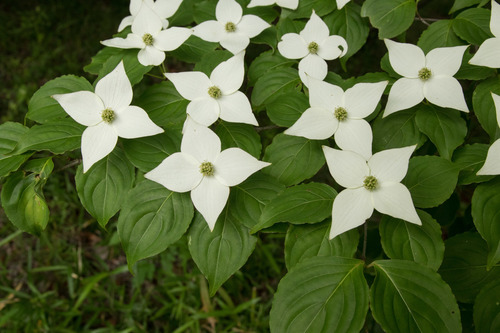
You might spot Kousa Dogwood, Red Maple, and Redbud Tree.
View guide →

Colorado, US
Observatory Park
You might spot Blue Spruce, Norway Maple, and Cherry Blossom.
View guide →
For a bigger project, try starting a family nature journal.
Frequently asked questions
At what age should kids start handwriting practice?
There's no single right age; follow your child's interest and your school's expectations. Drawing, big scribbles and familiar letter shapes are great early steps. An app's age range tells you who it's designed for, not whether your child is ready. When you do teach letters, use the model your school uses and ease off if it's uncomfortable or frustrating.
Should kids learn print or cursive first?
Follow whatever their school teaches. Schools and countries introduce print, joined writing and cursive in different orders, and there's no universal rule. If an app offers several styles, choose the one that matches the lesson.
Can tracing on a tablet replace pencil practice?
No, but it's a useful warm-up. A touchscreen can demonstrate a path and give instant feedback, while paper adds pencil control, pressure and spacing. If neat paper handwriting is the goal, always finish with a paper task and judge progress by everyday writing.
How long should a handwriting session be?
Short enough that your child finishes wanting more. Pick one small task and stop or take a break when focus or comfort drops. One good attempt beats a forced streak.
What if my child has diagnosed handwriting difficulties?
Use the plan from their school or therapist to set goals and choose tools. An app can be one part of that plan, but a score or left-handed setting isn't treatment. Ask the professional which letter models, adaptations and paper tasks suit your child.
Related reading
- Best spelling apps for kids: practice words, not just letter shapes
- Best reading apps for kids: options for word reading and stories
- Best nature apps for kids: turn screen time into outdoor discoveries