

- mushroom identification
- mushroom ID app
- fungi
- nature apps
- outdoor learning
- family walks
Best Mushroom Identification Apps in 2026 for Family Walks
Best mushroom identification apps for 2026: Snappit, Seek, iNaturalist and more, plus kid-friendly photo tips and ideas to make a fungi walk a discovery game.
There's a moment on every autumn walk when a small voice yells, "Mushroom!" and suddenly everyone is crouched around a tiny orange cap on a mossy log. The best mushroom identification apps turn that moment into a mini investigation. Our quick picks: Snappit for kids who want to collect every fungus they find, Seek for a free, private camera suggestion, and iNaturalist when you want real people to weigh in on a tricky find.
The one rule that matters: never eat a wild mushroom based on an app. Every tool in this guide is for looking and learning, not foraging. The North American Mycological Association's safety guidance explains why look-alikes and folk tests can't tell you what's safe. If you think someone has swallowed a wild mushroom, call your local poison center or medical service right away rather than checking an app.
With that settled, here's how to pick the right app and make a fungi hunt the highlight of your week.
How to choose a mushroom ID app
A few things make a real difference out on the trail:
- Saved photos you can revisit. Mushrooms change fast. Being able to look back at your pictures later is gold.
- Alternatives, not just one answer. Good apps show you similar candidates so you can compare.
- Works where you walk. Woods often have patchy signal. Check what runs offline and test it in airplane mode at home, since installing an app doesn't always download its recognition model.
- Fun for your kid. If your child is five, a field-guide interface may lose them in a minute. A collection or challenge keeps them hunting.
The best mushroom identification apps and references

Snappit: best for kids and family collections
Snappit is the app we built for our own kids, and fungi walks are where it really shines. Your child snaps a photo, Snappit suggests what it is, and the find becomes a collectible card with a rarity tier. Suddenly a bracket fungus on a stump is a "rare" card and everyone wants to find the next one.
Each card comes with short, friendly facts a six-year-old can follow, and the built-in field guide covers 9,000+ species, so the same app also handles the beetle on the log and the oak overhead. Finds go into a private family collection and discovery map, never a public feed. There are no ads and no chat, and it's rated 4+.
It's free to download on the App Store and Google Play, with free identifications every day and an optional subscription for unlimited snaps. Like any photo ID, treat a name as a great lead to check, and give the app a quick airplane-mode test before heading into the woods.
Seek: best free, account-free starting point
Seek by iNaturalist is free, needs no account and gives live camera suggestions plus observation challenges. The official comparison with iNaturalist confirms its identification model works offline and that records stay on your device when you don't log in.
Seek sometimes stops at a broad group like "gilled mushrooms," and that's a perfectly good answer. If you log in to share with iNaturalist, your records go public, so that's a grown-up decision.
iNaturalist: best for expert community feedback
iNaturalist is free and pairs automated suggestions with identifications from other naturalists. Add several photos, the date, location and habitat notes to one observation and you'll often get thoughtful replies. Community review takes time and a connection.
Offline camera suggestions are documented for the new iPhone app, unlike iNaturalist Classic, so check which version you have. Parents should set up the account and location-sharing settings before kids get involved.
Picture Mushroom: best fungi-only interface
Picture Mushroom focuses entirely on fungi, with photo identification and reference pages. Its official FAQ covers using camera or gallery photos and correcting a wrong suggestion. The App Store listing includes optional purchases and a subscription, so check your regional price, trial and renewal terms.
It's handy for an adult who wants to browse fungi in depth. Any toxicity info it shows depends on the identification being right, so treat every name as a starting point.
Regional keys and mycological clubs: best for going deeper
MushroomExpert's key to major groups is a brilliant way to learn how features separate fungi. It's a website rather than a photo app, and it leans North American, so look for resources that cover your own region.
The NAMA club directory lists North American clubs, and elsewhere a regional mycological society or naturalist-led walk is a fantastic family outing. Ask about beginner sessions.
Google Lens: best quick visual search
Google Lens finds similar images and can read names off signs. It's useful for a lead to research, not a confirmation, and it needs a connection. Similar-looking results can come from unreliable pages.
Mushroom app comparison
| Tool | Best for | Offline | Keep in mind |
|---|---|---|---|
| Snappit | Kids collecting finds as cards, private family map | Test before you go | Names are leads to check |
| Seek | Free first suggestion, private observations | Installed model works offline | May stop at a broad group |
| iNaturalist | Records and community discussion | New iPhone camera works offline; check your version | Sharing and review need internet |
| Picture Mushroom | Fungi-focused photo ID and references | Test in airplane mode first | Check purchase terms |
| Regional keys and clubs | Learning features in local context | Download permitted references beforehand | Some features don't show in photos |
| Google Lens | Searching images or names | Needs connection | Similar isn't confirmed |
How to photograph mushrooms without picking them

One cap photo leaves out a lot. MushroomExpert's study guidance stresses structure, what the fungus is growing on, nearby trees and field notes. Here's a kid-friendly version that leaves every mushroom where it grows:
- The whole mushroom from the path, nice and sharp.
- The top, showing the cap's shape and texture.
- A low side view of the stem and any gills, pores or teeth you can see without touching. No pulling, cutting or digging.
- The neighborhood: soil, leaf litter or dead wood, plus nearby trees if you know them, the date and a rough size.
- Keep the set together and jot down what you couldn't see.
Give your child a job: one is the photographer, one is the "habitat reporter." Stay on paths and follow park rules. If the base was hidden, write "unknown." That's real science.
Check an app's suggestion like a scientist

Before reading any app result, have your kid describe what they saw: "brown cap, a bunch of them on a fallen log, couldn't see underneath." Then check whether the suggested name matches several of those features and your region. Color alone is a weak clue, since age, rain and light all change it.
Keep three columns in your head: what we saw, what the app thinks and what we're missing. A blurry cluster might only support "fungus on dead wood" and nothing more. If two apps disagree, don't take a vote; ask a club or keep the broader label.
The mushroom and fungi guide has comparison clues, and the tree guide helps with the tree your fungus is growing on.
Mushroom and fungi shapes to compare
Explore the field guide →




Plan a family fungi walk

First fungi walk with little ones: open Snappit and challenge your kids to find three different shapes: an umbrella cap, a shelf on a tree and something squishy-looking on a log. Each snap becomes a card. House rule: we look and snap, we don't touch or taste.
A puzzling find you want help with: take several photos and post to iNaturalist with a grown-up managing sharing. Ask, "Which feature would tell these two apart?"
A collection to come back to: Snappit's family collection and map make it easy to revisit the same log next week and see what's changed. Add a quick sketch and note whether it grew on soil or wood.
Budding mycologists: pair a regional key with a local club walk. They'll learn far more than any app can show.
Browse Snappit Guides for parks near you. Many have checklists of what you can spot, so your kids can pick a mission before you leave. Check the park's own path and activity rules, then head out to find two different fungus forms without stepping off the trail.
Parks for a family fungi walk
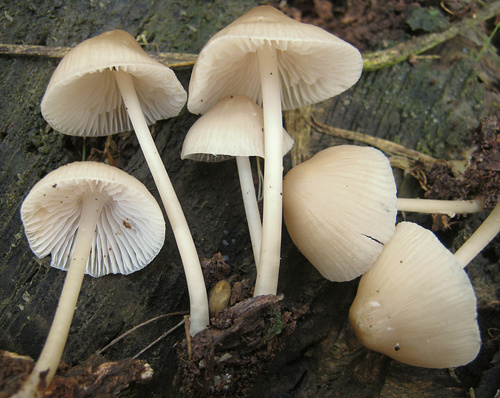
Virginia, US
West Springfield Park
You might spot Common Bonnet, Common Ink Cap, and Yellow American Blusher.
View guide →

British Columbia, CA
Pinecone Burke Provincial Park
You might spot Artist's Bracket, Fuligo, and Bluefoot Bonnet.
View guide →
Frequently asked questions
Can an app tell edible mushrooms from poisonous ones?
No. Many species have dangerous look-alikes that need extra evidence, and a wrong name makes any toxicity label meaningless. Use apps for learning, never for deciding what to eat.
Why does my app only say "genus" or a broad group?
Because the photo doesn't show enough to go further. Some fungi can only be separated with a microscope or specialist tests, so a broad answer is often the most accurate one.
Which mushroom app works offline?
Seek documents offline identification, and the new iNaturalist iPhone app does too, while Classic differs. Whatever you use, including Snappit, test it in airplane mode before a walk; community review and online search always need a connection.
Are mushroom apps good for kids?
Yes, when a grown-up is along. They're brilliant for teaching kids to notice shape, habitat and change over time, and Snappit's collectible cards keep younger kids hunting. Keep unknown fungi out of reach of little ones and pets.