

- local parks
- kids
- outdoor apps
- nature identification
- park activities
- family activities
- neighborhood
Best Apps for Exploring Local Parks with Kids (2026)
The best apps for exploring local parks with kids: Snappit for nature missions and collections, Seek, Merlin for bird songs, offline maps and 5 easy park quests.
The park down the street can feel like the same old swings and the same old path. Hand your kid a mission, though, and suddenly there's a beetle crossing the trail, a bird calling from somewhere up high, and a tree that's turned orange since last week. The best apps for exploring local parks with kids are Snappit for nature missions and collections, Seek for quick plant and animal IDs, Merlin for bird songs, and your park's own website or an offline map for the route.
You don't need all of them. One parent's phone and one good app is plenty to start. Below you'll find what each tool is best at, plus five easy quests that make the same park worth visiting again and again.
Best apps for local park exploration, by what your kid wants to do
| Your family's goal | Start with | Quick check before you go |
|---|---|---|
| Collect finds and complete missions over many visits | Snappit | Pick a park mission from the guide at home |
| Name a plant, bug or animal fast | Seek | Camera access is on |
| Figure out which bird is singing | Merlin Bird ID | Sound ID coverage for your region, offline pack downloaded |
| Share observations with a nature community | iNaturalist | Account set up by a parent, location settings reviewed |
| Find entrances, restrooms and closures | Park authority's website or app | Today's notices and opening times |
| Follow trails in a big regional park | Organic Maps | Map downloaded, official route info checked |
Snappit: turn every park visit into a mission
We built Snappit for exactly this: a kid, a parent's phone, and a park you visit all the time. Your child snaps a duck, an oak leaf or a ladybug, and Snappit identifies it and adds it to their collection as a card with a rarity tier and facts written for young readers. Plants, insects, birds, mammals, fungi and trees all count, so there's always something new to find.
Here's the part that works so well for local parks: Snappit has guides for thousands of parks, zoos and aquariums, each with a checklist of what you can spot there. Your kid picks a mission before you leave the house, and every snap ticks a species off the list. Repeat visits stop being boring because there's always one more card to find, plus badges and a daily discovery challenge.
Finding the same duck again still counts for something, too. Maybe this time you get a better photo or notice it dabbling for food. Browse the real-life collection idea for more ways families use it. Snappit has no ads, no chat and no social feed, and your family's finds stay on a private discovery map. It's free to download, with free identifications every day.
Seek: broad nature identification without an account
Seek by iNaturalist identifies living things through the camera and hands out discovery badges. It's a handy pick when your kid wants to know about a leaf, a beetle or a flower right now, and you don't need to sign up for the normal experience.
Sometimes Seek stops at a broader group when it can't get to the species. That's okay; look at the details together. Its privacy policy explains how ordinary use differs from optional public sharing through iNaturalist.
Merlin Bird ID: for birds you hear before you see
Merlin offers Sound ID, Photo ID and a step-by-step identification guide. Sound ID works best from a quiet bench, away from traffic and the basketball court. A fun trick: ask your kid to point toward the song before you look at the screen.
Cornell says Sound ID and Photo ID work offline, so set the app up before your walk. Sound ID coverage varies by region and doesn't know every bird everywhere, so compare the suggestion with what you see or with example recordings. Merlin's life list saves your birds, which makes it great for repeat visits. It pairs nicely with Snappit, which doesn't identify bird songs.
iNaturalist: for shared observations and longer projects
iNaturalist connects your observations with a community that helps identify them, and shared records can support biodiversity research. It suits a family that wants to document one corner of the park over a season or join a local project.
A parent should manage kids' participation and look over photos before posting. Observations are public; geoprivacy settings control how much location information others see, but obscuring coordinates doesn't make the whole observation private.
Your park authority: for today's practical info
Your city or park operator might have an app, a website or just a noticeboard. That's where you'll find splash-pad hours, trail closures, dog rules, events and accessibility details. No wildlife app can tell you whether the restroom by the pond is open today, so check the dated notices and contact them if something's unclear.
Organic Maps: for trails in bigger parks
Organic Maps gives you offline maps and walking directions built on OpenStreetMap data. Download the area at home, drop a pin on your entrance, and make sure it opens without signal. It's most useful when your "local park" is really a big web of trails. Follow official signs and closures over the map.
Plan a short park loop your family will enjoy

Keep the first outing small: a familiar entrance, one spot to stop and look, and a bench for a snack. A short loop near the restrooms and an exit is easier to cut short than an epic walk across the whole park. Bring water and the right layers, and build in playground time. It's part of the fun.
Snappit Guides let you browse parks and reserves and see what species you might find there, which makes picking today's mission easy. Confirm entrances, step-free access, surfaces and opening times with the park itself. If a long walk isn't going to happen, a bench-based listening game works beautifully.
Parks and reserves for your next family outing
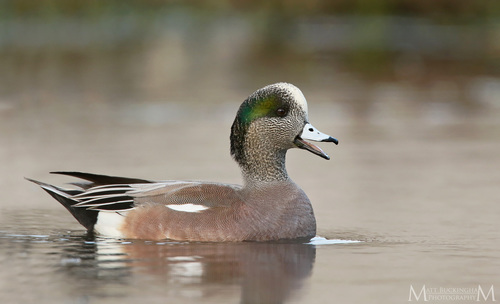
Washington, US
Evergreen Rotary Park
You might spot American Wigeon and Common Goldeneye.
View guide →
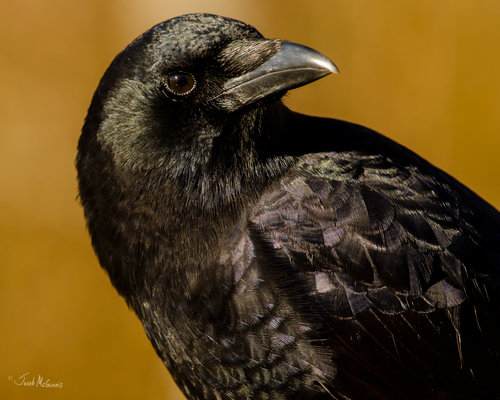
California, US
Cabrillo Heights Park
You might spot American Crow and Yellow-Rumped Warbler.
View guide →
Five park adventures you can repeat all year

Pick one adventure per visit and let your kid decide what counts as a cool find. None of these need rare wildlife.
- The changing tree. Photograph the same tree from the same spot every week. Buds, leaves, bare branches, fruit: what's different since last time? Our tree identification guide shows which details are worth capturing.
- Color bingo. Find three different colors on living things. Photograph flowers where they grow instead of picking them. No flowers? Bark, moss and leaves work too. Little ones name colors; older kids compare shapes.
- A sound map. Sit still and put a dot on paper for every direction you hear a bird. Then try Merlin on one song. Traffic and playground noise can go on the map too.
- The tiny safari. Watch ants, beetles and other small creatures along the edge of the path. Snap them without trapping or handling them, and leave logs and leaf litter alone where park rules ask. Our insect guide is a good warm-up.
- After the rain. Look for snail trails, worms, droplets and reflections. Stay off slippery banks and away from deep puddles. Then come back on a dry day and compare.
Want a printable version? Our nature scavenger hunt guide has you covered, and a sketch or a spoken description can count as a find just like a photo.
Turn a quick ID into real observation

Before anyone opens an app, ask a few questions: How big is it? Where is it sitting? What's it doing? For a tree, snap the whole shape and then a close-up of a leaf or the bark. For a bird, notice its color pattern and behavior from a respectful distance. One clear photo beats a dozen rushed ones.
App IDs are suggestions, so compare the result with our bird guide or a second photo. If the evidence is thin, "small brown bird" in the journal is a perfectly good answer. One firm rule: never use an app to decide whether a mushroom, berry or plant is safe to eat or touch.
Use these cards to practice describing what you see before your next visit.
Birds to get to know before your next park walk
Explore the field guide →








A repeat-visit routine that still leaves room for play

Let your kid choose the mission before you head out. At the park, snap a photo or check a name, then put the phone away and just watch. Siblings can rotate jobs: spotter, photographer (with a grown-up's help) and storyteller. Head home when the energy runs out; the goal is a nice afternoon, not a full checklist.
At home, flip through the new cards together. Ask what your kid remembers before looking at the screen, then check the photo. Add the date and a sentence to a family nature journal. Next time, go back to one familiar spot and ask a new question.
The activities grow with your child. Preschoolers can find a color or hear a song, early readers can name their finds, and older kids can compare visits and talk through tricky IDs.
Frequently Asked Questions
Which park app should we install first?
Pick the one that matches your kid's favorite question. Snappit for "Can we collect what we find?", Seek for "What is this?", or Merlin for "Which bird is singing?" Use the park's own website for logistics.
Can we explore the park without mobile data?
Yes, with a little prep. Download maps and set up Merlin at home, then test what you need in airplane mode. You can always take photos and identify them later, and a paper scavenger hunt works anywhere.
What if my child just wants the playground?
Do both. Find one leaf or listen for one bird on the way to the swings. If the nature mission isn't landing today, try again another day. Free play is a great park activity too.
Does our park need to be in Snappit Guides?
No. You can snap and collect nature in any public green space where it's allowed. A listed park adds a ready-made checklist of what to look for, which kids love, but any patch of green is worth exploring.