

- animal identification app
- Spanish
- bilingual families
- nature apps for kids
- wildlife
- Latin America
Best Animal Identification Apps for Spanish Speakers (2026)
The best animal identification apps for Spanish-speaking families: Snappit, Seek, iNaturalist and Merlin, plus regional guides for Spain and Latin America.
A lizard on a wall in Madrid, a pelican off the Mexican coast, a hummingbird in an Andean forest: Spanish-speaking families explore wildly different places, and the best animal identification apps for Spanish speakers need to keep up. Here's our short answer.
For kids who love collecting what they find, start with Snappit, which lists Spanish support and turns every animal you photograph into a collectible card. Add Seek for private, account-free exploring, iNaturalist for help from other naturalists, or Merlin for birds and birdsong. Then pair your app with a reference for the place you're actually visiting.
What Spanish support should mean
A translated store page doesn't guarantee that every screen, species name or explanation is in Spanish. Spend two minutes checking three things on the phone your family will use:
- Menus: can you and your kid follow the camera controls, results and settings?
- Names and facts: are there Spanish common names for the animals you'll meet, and is the supporting text in Spanish too?
- Place: does the app cover your country, island or habitat, and does that apply to photos, sounds or both?
Common names change from country to country. A tecolote in Mexico is a búho or mochuelo elsewhere, so keep the scientific name next to the local one when comparing results. A missing Spanish name doesn't mean the species is missing from the app, and an unfamiliar name doesn't make the ID wrong.
iNaturalist, for example, lets you choose common-name languages and optional place preferences in its website settings, which carry over to its mobile apps. Missing names stay missing rather than being auto-translated. Its official common-name guide shows how to set it up.
The best animal ID apps for Spanish-speaking families

| Tool | Best for | Spanish support to check | Keep in mind |
|---|---|---|---|
| Snappit | Kids collecting photo discoveries as a family | Spanish is listed for iOS; check names in the installed app | Test the features you need offline before a trip |
| Seek | Private camera-based nature exploring | Spanish is listed in its iOS languages | An instant suggestion may stop at a broad group |
| iNaturalist | Observations other people can review | Spanish site options and common-name preferences | Posting and community review need a connection; responses vary |
| Merlin Bird ID | Bird photos, sounds and regional bird guides | Spanish resources and bird-name settings | Sound ID covers fewer species than the wider guide |
Snappit: best for kids collecting discoveries together
Your six-year-old spots an iguana sunning on a rock. You snap it together, and Snappit tells you what it is and adds a card to their collection, with a rarity tier and short facts written for young kids. That's what keeps families coming back: every walk grows a collection of real animals, plants, insects and birds your kid found themselves, with badges and a daily discovery challenge along the way.
Snappit en español offers Spanish website and field-guide resources, and its official iOS listing includes Spanish among the supported languages. The official Android listing describes photo identification, collections and discovery goals. It's built for roughly ages 4 to 10 exploring with a grown-up, with no ads, no chat and no public feed. Snappit is free to download with free identifications every day and an optional subscription for unlimited snaps.
Download it on Google Play or the App Store, check the Spanish names in your installed app, and use each suggestion as a conversation starter. If you'll be out of signal, snap now and identify later.
Seek: best easy first outing
Seek by iNaturalist is free and needs no account. Its Spanish App Store listing lists Spanish. It's a nice way to explore without creating public records, and "mariposa" is a fine result when the photo can't support a species name.
The official Seek/iNaturalist comparison says Seek can identify on the device without internet, and it explains how that private mode differs from optional posting to iNaturalist.
iNaturalist: best for help beyond the first suggestion
Choose iNaturalist when a parent or older kid wants to document a sighting and ask other naturalists for help. Add a clear photo, the date, the place and notes like size or behavior. Reviewers can refine the first suggestion, though a reply isn't guaranteed.
Users 13 and up can create their own accounts. For younger kids, follow iNaturalist's parent or guardian consent procedure, or simply use a parent's account or Seek for shared outings. Check location visibility before posting anything from home or school.
Merlin: best bird companion
Merlin is the app to pair with Snappit when your kid wants to know who's singing. Cornell's Spanish Merlin overview describes photo identification, sound suggestions and regional bird content. Pick Spanish bird names in the app's language settings, download regional content through My Offline Birds, and compare matches with plumage, habitat and your recording.
The official overview lists Sound ID for the US, Canada and Europe, plus some birds of Central and South America and India. Downloading a region doesn't add species to Sound ID. Our bird-app comparison covers more options.
If the walk turns into a plant hunt, check our plant-focused guide or plant identifier. Snappit handles plants too, so one app can cover the whole walk.
Add a reference for Spain or Latin America

Spain
SEO/BirdLife's Guía de Aves de España is a free regional bird reference. Its updated identifier narrows candidates by color, size, habitat and song, which is handy when a bird flashed past and you didn't get a photo. It covers birds in Spain specifically.
Mexico and other Latin American destinations
Mexico's CONABIO recommends Naturalista for photo observations and community identification. For other countries, check the iNaturalist network directory for local projects and observations.
Before a trip, browse records from the specific park, province or island and compare season and habitat. They show what others have documented, not a guarantee of what you'll see. For tricky insects, young animals or look-alikes, a family or genus name is often the most honest answer a photo can give.
Use our animal identification guide to compare visible features, then flip through these animal reference cards with your kid.
Animal cards for comparing features with your kid
Explore the field guide →












Prepare for weak signal and uncertain results

While you're still on Wi-Fi, install updates, then open Merlin's settings and go to My Offline Birds. Add your destination region, plus extra sample recordings if you have space. Cornell's current offline guide explains that online Merlin automatically downloads nearby bird info, while Sound ID works separately from regional and extra-sound downloads. Then test each task in airplane mode, because opening a guide, identifying a photo and uploading an observation are three different things. Seek's on-device ID and Merlin's offline features still need a connection for community uploads. For Snappit, snap your photos on the trail and identify them once you're back in signal.
On the walk, try this routine:
- Look first. Notice the habitat, rough size and behavior before checking any result.
- Keep evidence. Take a clear photo from a respectful distance, plus a second angle or audio if it helps. Never handle wildlife for a better shot, and keep well away from anything that could be dangerous.
- Compare options. Check visible features and the regional range instead of grabbing the first label.
- Be honest about doubt. Write "possible" next to a tentative name, or save the broader group, and ask for community help later if your evidence is good.
A distant little brown bird might only earn "small brown bird." That's still a great observation, and next time you can watch for its bill, markings or song.
Make a Spanish-English nature walk memorable

Pick a familiar park and a small mission: one bird, one insect and one other animal if you find them. You handle the camera while your kid describes what they see. For a bird, ask in Spanish: ¿De qué color es? ¿Dónde estaba? ¿Qué estaba haciendo? Add the English name afterward if that suits your family, and keep the scientific name for matching references.
At home, record four things: the photo or sketch (or the card from your Snappit collection), the Spanish name, the English name if you like, and one observation in your kid's own words. If you only got a group name, that's what goes in the journal. Don't turn a broad word like gorrión into an exact species without good evidence. Go back to the same place and hunt for a feature you missed, rather than racing to fill the collection.
These park cards can help you pick an outing. Check each venue's official access info and opening hours before you go.
Parks for a family wildlife walk
Spain, ES
Jardín del Turia
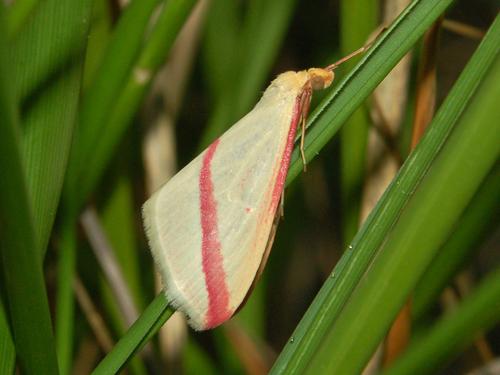
You might spot Vestal, Collared Dove, and Common Blackbird.
View guide →

Andalusia, ES
Doñana National Park
You might spot Green Hairstreak, Natterjack Toad, and Lobed Argiope.
View guide →
Frequently asked questions
Which app should a Spanish-speaking beginner try first?
For kids, start with Snappit: it lists Spanish on iOS and turns every find into a collectible card. Seek is a great account-free option, Merlin is best for birds, and iNaturalist is the one for community discussion.
Does Merlin work throughout Latin America?
Partly. Its bird guide and its Sound ID have different coverage; some Central and South American birds are supported for sound, but not all. Download your destination's content and check Sound ID for the birds you're hoping to hear.
Can we use Spanish and English together?
Yes. Keep both common names when you have them and use the scientific name to line up references. iNaturalist supports multiple common-name preferences, though not every species has a name in every language.
What if two apps disagree?
Keep the original photo and notes, compare both suggestions with a regional reference, and mark the entry as tentative. Community reviewers may help, but some photos just can't be pinned to a species.