

- insect identification
- bug identifier app
- beetles
- bees
- kids nature apps
- outdoor learning
Best Insect Identification Apps in 2026 (Kid-Tested Picks)
The best insect identification apps for 2026: Snappit for kids, Seek, iNaturalist, Google Lens and Picture Insect, plus photo tips to ID any bug you find.
Your five-year-old is crouched over a shiny beetle on the path, nose six inches from it, asking "What IS that?" for the third time. An insect identification app turns that moment into an answer in seconds, and a good one makes your kid want to find the next bug.
The quick picks: for kids and families, start with Snappit, which IDs the bug from a photo and turns it into a collectible card your child can show off later. Seek is a great free, no-account option that works offline. iNaturalist is best when you want real people to weigh in on a tricky find, and a regional field guide helps you check that a name fits where you live. Here's how each bug identifier app compares, plus how to take photos that get better answers.
Which insect identification app is best for your family?
| App | Best for | Cost and access | Keep in mind |
|---|---|---|---|
| Snappit | Kids building a bug collection with a grown-up | Free download with free daily IDs; optional subscription; iOS and Android | A match is a suggestion; check tricky look-alikes |
| Seek | Quick live suggestions with no account | Free; iOS and Android | Automated suggestions, not community confirmation |
| iNaturalist | Getting other naturalists to review a find | Free; mobile apps and web | Observations are public; check account settings and app version |
| Google Lens | Searching the web from a photo | No separate subscription; depends on your device | Open the source to see if it backs up the name |
| Picture Insect | An insect-only photo identifier | Commercial app with Premium subscription options | Check local price, trial terms and features |
| Regional field guides | Comparing local look-alikes | Website, book or app; costs vary | Region, life stage and coverage |
Snappit: best insect app for kids
We built Snappit for our own kids, and bugs are where it really shines. Snap a photo of a ladybug, bee or beetle and Snappit suggests what it is, then turns it into a collectible card with a rarity tier and short facts written for young readers. A six-year-old can follow them, and a four-year-old loves hearing them read aloud. Kids chase badges, complete collections and take on a daily discovery challenge, so a ten-minute garden walk suddenly has a mission.
It also identifies plants, birds, flowers, mushrooms and more, so you don't need a separate app when the beetle wanders onto a dandelion. The built-in field guide covers 9,000+ species, and every find lands in a private family collection and discovery map rather than a public feed. There are no ads, no chat and no strangers. It's free to download with free identifications every day, and an optional subscription unlocks unlimited snaps. Get it on Android or iOS.
Seek: best free option without an account
Seek by iNaturalist gives live camera suggestions, badges and challenges without any sign-up. Its core identification works offline, which is handy on trails with no signal. It works best on an insect sitting still in good light. If it stops at "beetle" or a family name, that's a fair answer for a fuzzy photo.
iNaturalist: best for a second opinion from real people
iNaturalist pairs automated suggestions with identifications from its community. Sometimes a specialist chimes in, though a response or an exact species isn't guaranteed. Sharing and comments need a connection. The new iPhone app has on-device camera suggestions; Classic and other versions may not work the same way offline.
Observations are public, so review the photo and location settings before you upload. With younger kids, run it from a parent's account or stick with Seek or Snappit. iNaturalist has an under-13 parent or guardian consent procedure if your child wants their own account.
Google Lens: best for digging into web sources
Google Lens searches from your camera or a saved photo. It may already be built into your Google app, Photos or camera, depending on your phone. Tap through to the actual results and favor a museum, local natural-history group or similar reference. Look-alike images are clues, not a confirmed ID.
Picture Insect: a dedicated bug identifier
Picture Insect is built just for insect photo ID. Its FAQ describes Premium membership and how to correct a suggested name. Check the current offer in your store before starting a trial, since not every feature is free.
Regional field guides: best for checking local look-alikes
A guide for your country or region helps you test whether an app's suggestion makes sense. The British Dragonfly Society identification resource, for example, covers British dragonflies and damselflies. Look for the local equivalent where you live. For butterflies, see our butterfly app guide.
How to photograph insects for a better ID

Start with a sharp photo of the whole insect. Tap to focus and skip heavy digital zoom, which turns legs and antennae into mush. Wait for the bug to settle instead of chasing it, and only grab a second angle if you can do it from where you're standing.
| Insect | Extra view that helps | Worth noting |
|---|---|---|
| Beetle | Top view of the wing covers, plus a side view | Leaf, bark, soil or flower where it sat |
| Bee, wasp or fly | Head, antennae, legs and wings | Which flower it visited and what it was doing |
| Butterfly or moth | Wing pattern in its natural resting pose | Date, place and daylight or porch light |
| Caterpillar | Whole body and markings | The plant it was eating, if you saw it eat |
| Dragonfly or damselfly | Side and top views if you can | Pond edge or other habitat and time of year |
Snap the plant separately if it helps, but don't assume a bug resting on a leaf eats it. Keep the original photo as well as any crop, and jot down the date and rough location.
The one rule that matters: look, don't touch. Don't pick up, trap or feed insects, and stay well away from nests. An app can't tell you whether a bug or nest is safe to approach.
How to tell insects apart: beetles, bees, flies and more

Here's a fun first lesson for kids: adult insects have six legs and three main body parts, though a photo might hide a few. Spiders have eight legs and aren't insects at all (see our spider guide). Caterpillars and grubs can look nothing like the adults they become.
A few clues to check together:
- Beetles: hard wing covers that meet in a line down the back. Compare body shape and antennae in the beetle guide.
- Bees, wasps and look-alikes: compare antennae, head shape, waist and wings in the bee and wasp guide. Stripes alone won't tell them apart.
- Flies: adults have just one working pair of wings, though a photo may not show enough to count.
- Dragonflies and damselflies: compare eyes, how they hold their wings and body shape in the dragonfly guide.
Browse more shapes and names in the insect field guide. The cards below are examples from the guide, not a list of what lives in your yard.
Insects to compare before your next bug hunt
Explore the field guide →





What to do when the app isn't sure

If two apps disagree, don't just go with the majority. They may use similar images and models, so agreement isn't proof. Instead, turn it into detective work with your kid:
- Separate what you saw from the guess. Write "small green beetle on a leaf" next to the suggested name.
- Find the missing clue. Was the head hidden? Did the photo show the wing covers or just a blur?
- Check place, season and life stage. A guide for another continent, or an adult photo, won't solve your larva.
- Ask for help when it matters. Add several photos of the same bug to one iNaturalist observation and describe what you saw.
- Be happy with "beetle." A broader answer is often the most accurate one, and kids find that reassuring.
Worried about a household pest? An app can help you describe the insect to a local extension service or pest professional, but it can't confirm an infestation, diagnose a bite or choose a treatment.
A 20-minute insect walk your kids will want to repeat

Pick a short park path or the edge of your garden. Before anyone opens the app, ask each child to watch one insect and describe how it moves. Then snap a photo from the path and put the phone away. No usable photo? You still have something to talk about.
At a bench or back home, open the find in Snappit or compare it with a field-guide card. Ask "Which clue matched?" and "What couldn't we see?" Save it to your collection or journal. Next visit, compare the habitat and season and see what's new. Watching the card collection grow week by week is a big part of the fun.
For a longer activity, try the family nature journal guide or the park scavenger hunt guide. The places below are starting points for planning; check each park's access and rules before you go.
Parks for a family bug hunt
New York, US
Sears - Bellows Pond County Park
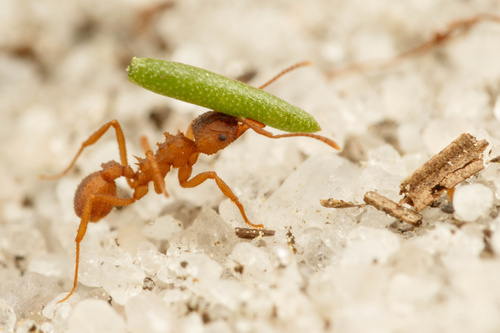
You might spot Northern Fungus-Farming Ant and Bronzed Tiger Beetle.
View guide →
Texas, US
Antoine Greenspace
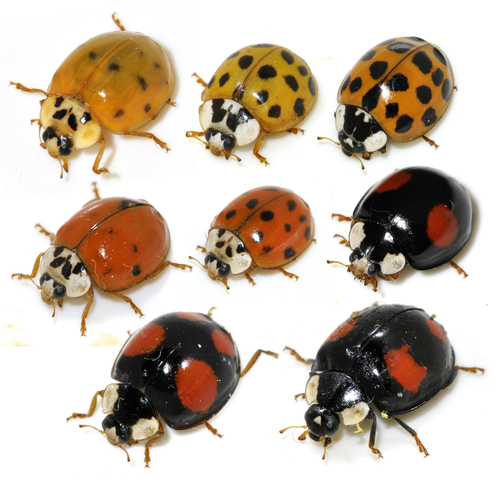
You might spot Asian Lady Beetle, American Bumble Bee, and Bee.
View guide →
Frequently Asked Questions
Can an app identify every insect species?
No. A photo may miss the key detail, and similar species or young stages can stay unsolved. When the evidence only supports "beetle" or a family name, keep that.
What's the best insect identification app for kids?
Snappit is our pick for kids because every bug becomes a collectible card with kid-friendly facts, and it's ad-free and private. Seek is a good free alternative that works without an account.
Which insect app works without mobile data?
Seek's core identification works offline. The new iNaturalist iPhone app also offers on-device suggestions, but check your version before you leave. Community discussion and web searches need a connection, so save photos to check later.
Does a confident result mean an insect is safe to touch?
No. A name or confidence score isn't handling advice. Watch the insect where it is and leave nests alone.
How do I help my child learn from an uncertain result?
Ask them to describe two features they could see and one clue that was missing. Compare those notes on your next walk; that's real science.