

- reptile identification app
- snake identification
- lizards
- turtles
- amphibians
- nature apps for kids
Best Reptile Identification Apps in 2026 for Families
The best reptile identification apps in 2026 for snakes, lizards, turtles and frogs. Compare Snappit, Seek, iNaturalist and more, plus safe photo tips for kids.
A lizard sunning itself on a warm wall, a turtle sliding off a log: a sighting like that can turn an ordinary walk into the highlight of your kid's week. The best reptile identification apps help you put a name to it and keep the excitement going.
The short version: Snappit is our pick for families, because every lizard, turtle or snake your kid snaps becomes a collectible card with facts written for young readers. Seek is a great free, no-account camera tool, iNaturalist lets the community weigh in, a regional field guide tells you what actually lives near you, and Google Lens is handy for further reading.
Reptile safety first: keep your distance
Here's the one rule that matters: don't touch, catch or corner a reptile, and keep kids and pets well back. Leave the animal a clear escape route, use your camera's zoom, and follow the venue's rules. The National Park Service's wildlife guidance recommends exactly that: distance, zoom lenses and no disturbance.
An app's suggestion can't tell you whether a snake is safe, and neither can color, head shape or an old rhyme. If a snake is on your path, step back and give it space instead of moving in for a photo. If someone is bitten, get urgent medical help and follow local emergency advice right away; WHO's snakebite guidance explains why speed matters. With that settled, the rest is pure fun.
The best reptile and amphibian ID apps

Snappit: best reptile app for kids and families
Snappit is the app we built for our own kids, and reptiles are some of their favorite finds. Snap a photo from a safe distance and Snappit suggests what it is, then turns the sighting into a collectible card with a rarity tier and short, friendly facts a six-year-old can follow. That shy skink becomes a prized card, and suddenly your kid wants to know where skinks like to hide and what they eat.
The same app covers the frog by the pond, the dragonfly above it and the tree it's all happening under, so you don't need a different app for every find. Kids earn badges, complete collections and take on a daily discovery challenge, and the built-in field guide has 9,000+ species to explore back home. Planning a zoo trip? Snappit has guides for thousands of parks, zoos and aquariums with checklists of what to spot, so your kid can pick a reptile mission before you leave the house.
Your family's collection and discovery map stay private, and there are no ads, chat or strangers. It's free to download with free identifications every day; an optional subscription unlocks unlimited snaps. Get it on the App Store or Google Play. Like any ID app, treat the name as a great lead to check, and leave the animal right where you found it.
Seek by iNaturalist: free, simple and offline
Seek offers camera-based identification and observation badges with no account needed. Its on-device camera ID works without internet, according to iNaturalist's comparison of Seek and iNaturalist, which makes it useful on trails with poor signal. Seek and iNaturalist are free to use.
If the camera stops at a family or genus, that's a fine answer. Keep it rather than creeping closer for a better shot.
iNaturalist: let the community weigh in
iNaturalist pairs automated suggestions with identifications from other users. It's great when you want to log a date, location, habitat and several photos, then come back to the discussion later. Replies aren't guaranteed or instant.
Posting needs an account and observations are public, so review the account rules before using it with kids. Check the geoprivacy settings for home locations and sensitive species; obscuring coordinates doesn't hide every detail.
Regional field guides: what actually lives near you
A wildlife agency, museum or good regional guide narrows the list to species that really occur where you are. The Missouri Department of Conservation's A Guide to Missouri's Snakes is a good example, and it covers Missouri only. Look for range maps, photos of juveniles, habitat notes and look-alike comparisons. Download one before a trip and open it in airplane mode to make sure it works.
Google Lens: a jumping-off point
Google Lens runs an image search from your photo and can lead from a clear lizard shot to possible names and reference pages. Open the source and check the region and matching features, because a similar-looking web image isn't an expert ID.
Reptile ID apps compared

| Tool | Best for | Connection and sharing | Keep in mind |
|---|---|---|---|
| Snappit | Kids identifying, collecting and learning about finds | Private family collection; no public feed | Check the suggestion against a local guide for tricky species |
| Seek | Quick camera suggestion and badges | Core camera ID works offline; no account required | Broad results and missed species happen |
| iNaturalist | Documenting and discussing an observation | Online; posting is public with location controls | Reviews take time and may stay unresolved |
| Regional guide | Local species and look-alikes | A downloaded file or book works offline | Only covers its stated region |
| Google Lens | Finding candidate names and pages | Needs internet for search | Search similarity isn't an expert ID |
Where you are matters as much as which app you pick. iNaturalist notes that suggestions work better in areas with lots of iNaturalist activity and can miss species. Two apps agreeing may just mean they're working from similar photos.
How to photograph a reptile for a better ID

- Get the whole animal first. Head, body, legs, tail or shell, all in frame if you can, using zoom from where you already are.
- Note the setting. Region, date and habitat: pond edge, dry wall, woodland or backyard. Estimate size using things that are already nearby.
- Look beyond color. For a lizard, check its toes and proportions; for a turtle, its shell and head markings. Young animals, shadows and reflections can change how a pattern looks. Never flip an animal to see more.
- Be okay with "lizard." If key details are blurry or hidden, a broad group is a true answer. Kids love learning that scientists say "not sure yet" too.
- Check later. Compare with a local guide, or ask the iNaturalist community about your original photos.
Our reptile photo identifier and amphibian guide are great places to compare. Fun fact for kids: frogs and salamanders are amphibians, not reptiles.
Reptiles to look up in the field guide
Explore the field guide →








Make a reptile sighting a family adventure

Before a park visit, choose a question together: "How is a turtle's body different from a lizard's?" Watch from the path, describe what you see, and sketch or snap a photo if the animal stays put. Leave rocks and bark where they are, and don't chase, feed or collect wildlife (frogs included).
Zoos are perfect for up-close reptile learning with glass in between. Open the zoo's checklist in Snappit, let your kid tick off each reptile they snap, and compare the app's suggestion with the enclosure label. Ask staff about each animal's habitat. If you log it on iNaturalist, mark it as captive rather than wild.
Afterward, jot down one thing you noticed, one question, and whether the name was confirmed by a label. The parks and zoos below are outing ideas, so check rules, exhibits and access before you go; they aren't reptile-sighting forecasts.
Parks for a reptile-spotting walk
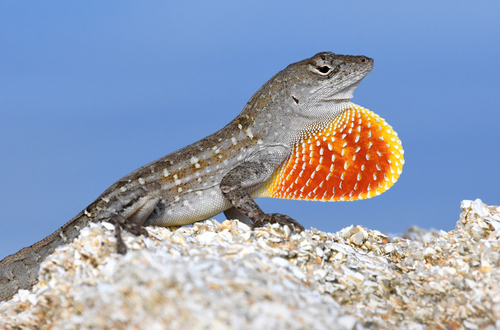
Florida, US
Tamiami Regional Park
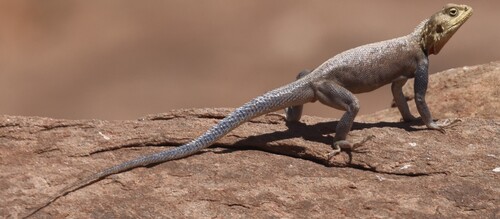
You might spot Brown Anole, Brown Basilisk, and Peters's Rock Agama.
View guide →

New Jersey, US
Batona Trail
You might spot Eastern Box Turtle and Painted Turtle.
View guide →
Zoos for up-close reptile learning

South Dakota, US
Reptile Gardens
You might spot Aldabra Giant Tortoise and Saltwater Crocodile.
View guide →

Florida, US
Everglades Alligator Farm
You might spot American Alligator, Crocodile, and Caiman.
View guide →
Frequently asked questions
Can an app tell me if a snake is venomous?
No. An app can suggest a species, but it can't tell you a snake is safe. Keep your distance from any unknown snake, and for a bite, get urgent medical help instead of checking apps.
What if two apps give different names?
Treat both as candidates and compare visible features and the local range. If the photo doesn't show enough detail, stick with a broader name like "lizard." Never disturb the animal to settle it.
Can these apps identify frogs and salamanders?
Yes. Snappit, Seek and iNaturalist all cover amphibians as well as reptiles. Life stage matters, since a tadpole looks nothing like an adult frog. Our frog guide is great for comparing photos.
Which reptile app should a family try first?
Snappit is the best first pick for kids who want to identify, collect and learn about what they find. Add Seek for free offline suggestions, a regional guide to check local species, and iNaturalist if you want community input later.